
These days your phone is far more than calls and texts – it’s a pocket stylist, colour consultant and floor‑plan wizard. Download a few clever apps and spruce up your place without lifting a roller. When you’re ready, Above Board Interiors turns your digital ideas into flawless walls, crisp ceilings and paintwork that lasts.
Design Your Home with the Power of Your Phone
Request A free Quote Today!
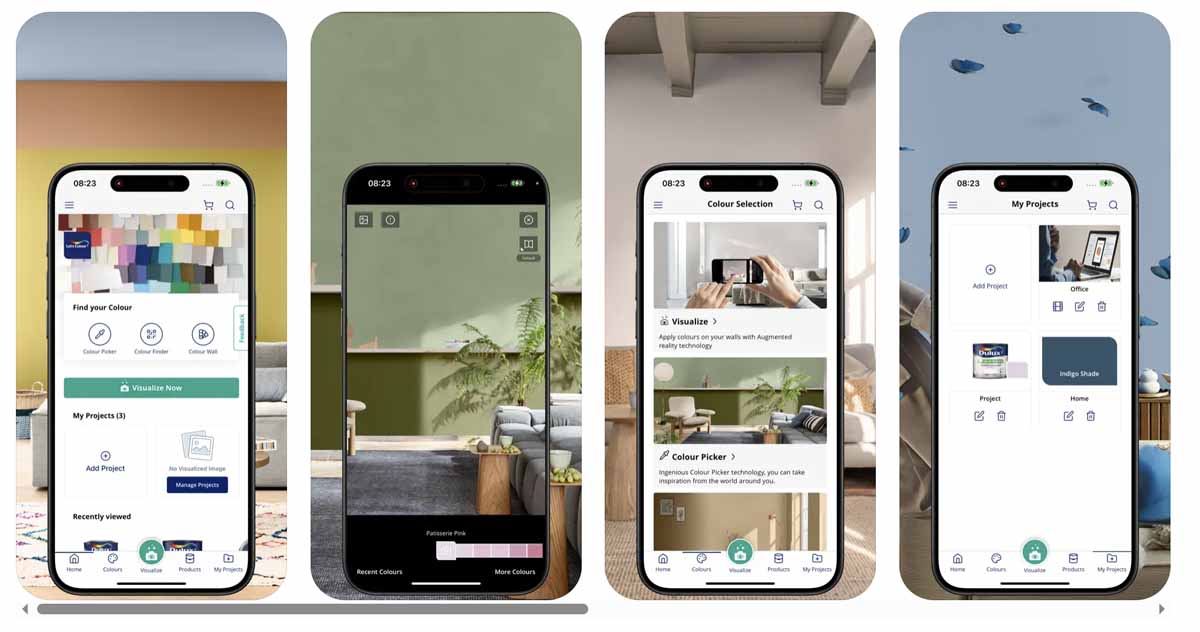
Apps that will help you visualise your dream abode
Lighting, layout and furniture can completely change a colour’s vibe. That dreamy blue in your friend’s lounge could look totally different from your feature wall. Luckily, paint-colour apps let you experiment virtually without the messy test pots! Here’s a few we recommend:
Dulux Visualiser – See Dulux colours on your actual walls in AR. Point your phone, tap a hue and preview the room instantly. Save favourites and share with your whānau for quick decisions.
Magicplan – Create accurate floor plans, add objects and generate estimates – straight from your phone. Great for mapping that new open‑plan layout before we plaster and paint.
Houzz (Visual Search/Match) – See a lamp or sofa you love? Snap it and Houzz finds similar products to buy. Handy for building a shopping list that suits your palette.
COLORSTEEL® Visualiser – Not ColorCote? Try COLORSTEEL’s visualiser to test roofing colours and profiles on typical NZ homes.
Colour‑match like a pro
Resene ColourMatch – Capture a colour from a flower, cushion or artwork and match it to the nearest Resene paint. The app also suggests complementary colours for a complete scheme.
Pantone Connect –For design‑savvy homeowners, Pantone Connect lets you build palettes, measure colour with a match card and cross‑reference values – handy when coordinating paint, fabrics and finishes.
Ready to make it real?
Phone apps are brilliant for testing ideas – but perfect walls and ceilings still come from expert prep and finishing. That’s where Above Board Interiors steps in. We supply, fix and stop GIB®, repair ceilings, and deliver paintwork that looks good up close (not just on camera). Explore our services:
- GIB® Fixing Auckland – Solid foundations for perfectly flat walls and ceilings.
- GIB® Stopping Auckland – Seamless, paint‑ready surfaces with a high‑grade finish.
- Interior Plastering – From patch repairs to full interiors, done right the first time.
- House Painting – Surface prep + premium paints for a flawless final layer.
- Suspended Ceilings – Clean lines, better acoustics and easy access to services.
Book a free quote: 021 446 716 or Contact us.
FAQs About Design Apps
Do colour visualiser apps show the exact paint result?
Colour visualiser apps such as the Dulux Visualiser are great for exploring options, but they can’t replicate the exact finish in your home; screen calibration, camera white balance, room orientation, natural and artificial lighting, and the paint’s sheen all influence the result. Treat them as inspiration only and always trial real paint, best is to apply sample to properly prepared areas primed and sanded plasterboard or lining, then view the patches at different times of day before you commit.
What’s the quickest way to capture a room layout on my phone?
Use MagicPlan to scan rooms with your phone’s camera and generate a measured floor plan in minutes, complete with walls, doors, windows, objects and notes which you can export or share as a PDF. This tool is ideal for briefing our team ahead of GIB® fixing or home renovation work.
Can I match a colour from a photo taken in natural light?
Yes, try Resene ColourMatch: photograph the subject in even natural light (avoiding shadows and glare), select the area in the image, and the tool will suggest the nearest Resene colour plus complementary hues – because screens and photos vary, confirm with a sample pot or colour card on your wall and check it in daylight before buying.
Is there an app to try roof colours on my own house?
Yes it’s ColorCote Roof Viewer lets you upload a photo of your home, mask the roof area and preview different ColorCote colours and finishes, and there’s also a web‑based Visualiser for use in your browser that can be used to narrow choices, then confirm with real product swatches outdoors, as roof colours can shift noticeably with sun, shade and viewing angle.
What’s an easy tool for hanging frames straight?
Use your smartphone’s level: on iPhone, open the Measure app and select Level; on Android, use the built‑in level or a free bubble‑level app, then place the device on the frame or against the wall and adjust until it reads 0°.